
In time for the holidays, Sphero, makers of smartphone controlled toys like Ollie and BB-8, will have R2D2, zooming around your table top, complete with lights, chirps, and retractable third leg.
In case you were wondering what to get me.
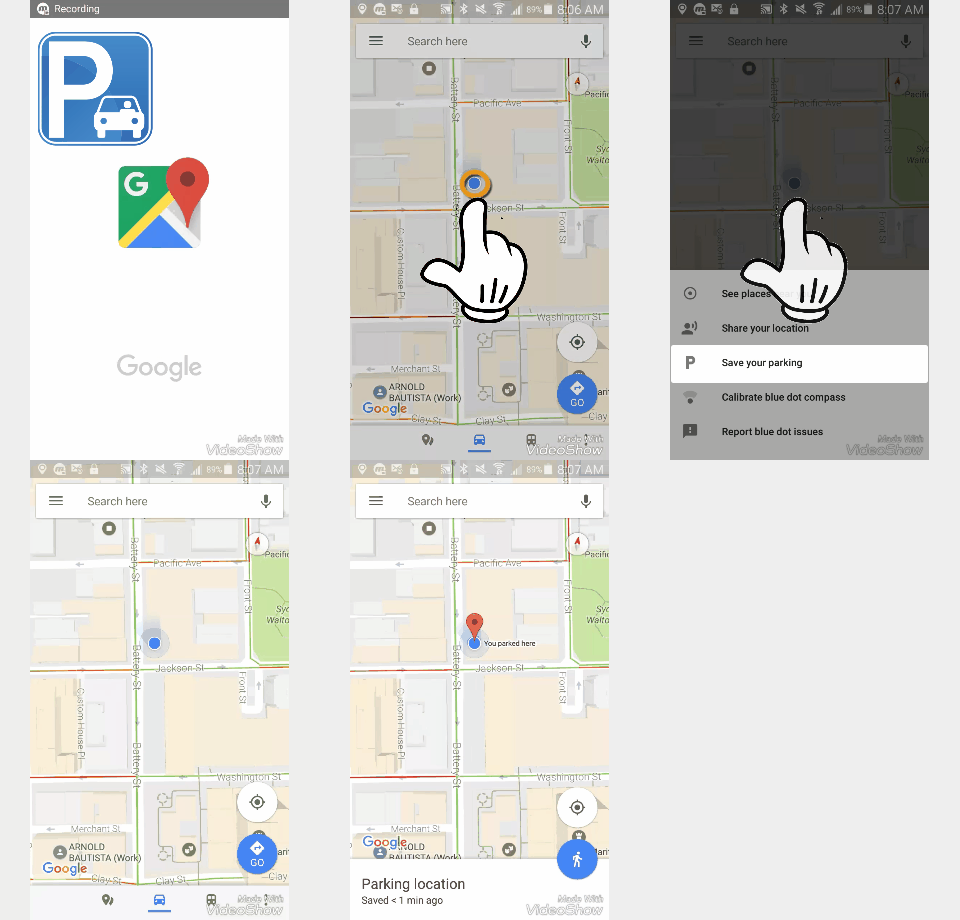
Although I’ve not had the cinematic misfortune to see Ashton Kutcher utter this titular question, I have, occasionally, misplaced my car.
But no more; with the latest update to Google Maps you can record where you parked your car, and when.
Click image for video.
 . A menu will appear.
Notifications remind you when it’s time to feed the meter, and a map directs you back to your vehicle.
 |
 |
Cheers!
hɔuᴉnb
Related posts:
Comments and questions are always welcome!
Honey, have you seen my phone?
You don’t need a tracking device to locate your Android phone. Just log into your Google Play Store account and access the Android Manager.
You can have your phone send out a Here I am! ring, or lock the device with an “If found, please return..” message;
…to reunite you with your lost loved one.
To Locate your Android Phone
 icon and select Android Device Manager.
 will appear highlighted.
Cheers!
hɔuᴉnb
Related posts:
Comments and questions are always welcome!
To borrow from ‘Taylor Swift’, We will never ever ever …wear an iWatch (despite how cool we secretly think they look). So we are really excited by the new #androidwear coming out in time to vie for your holiday bonus bucks. Here’s a peek at the ASUS model, expected in to hit stores next week.
Dan Rubino, of Windows Phone Central, put together a tête-à-tête-à-tête comparison, pitting newcomer Cortana (Windows phone 8.1) against veterans Siri (Apple) and Google Now (Android). Although presented fairly objectively, consider the source when reviewing, and judge for yourself.
If you want to skip the 7 minute video, here’s the the blow-by-blow. In many cases each assistant handled its task slightly differently. For more details view the video, or follow this link to wpcentral.com’s article.
|
|
Siri
|
Cortana
|
Google
|
| Settings “Turn off WiFi.” |
 |
|
|
| Social media “Four Square, check-in.” |
|
|
|
| Connect “Call _____ using Skype?” |
|
|
|
| Events “When’s the next Miami Heat game?” |
|
|
|
| Flights “Flight status, AA125.” |
|
|
|
| Appointments “What’s my schedule?” |
|
|
|
| Web Browser “Go to CNN.com.” |
|
|
|
| Notes “Note: I need to repark the car.” |
(w/Notepad) |
(w/One Note) |
(w/email) |
| Navigation “Where’s the nearest Dunkin Donuts?” |
|
|
|
| Weather “Whats the weather like Tuesday?” |
|
|
|
Cheers!
hɔuᴉnb
Google; in your home, on your streets and, soon, on your wrist! The Google smartwatches, or Androidwear, are coming to a mall near you. Watch this video from GoogleMobile to see why you want one.
Spoiler alert: you’re cell phone’s days are numbered.
Cheers!
hɔuᴉnb
Your on the go and need to capture or produce an image from your phone? Let’s say, for instance, that you are planning of finally redeeming that Groupon you purchased. Or, perhaps, you plan on flashing your e-ticket to the airline check-in attendants. These would be bad times for your 4G or WiFi connection to fail. In preparing for hi-stress situations you are best served if you plan for technology to fail. Sure; one way to mitigate against an awkward moment by printing is by producing a printout of your ticket or voucher. My, how old skool!
Another, less retro, failsafe involvles capturing a screenshot of your e-ticket or voucher prior to use, while your internet connection is rock-steady. That way, if you lose connectivity, you still have the image on your phone to present when needed. And, yes, these methods also work with instant messenger apps (e.g. Snapchat).
 Android phone
At the same time, press the On/Off switch and the Volume down buttons.
The image is captured and added to your Picture album/gallery.
Newer Samsung users: In addition to the above Android instruction, with newer Samsung phones (e.g. Galaxy 4) you can capture a screen with a hand gesture. The setting activated by going into your System Settings, under Motions and gestures.
 iPhone
At the same time, press the Power and the Home buttons.
The image is captured and added to your Camera Roll
 Windows 8 phone
Cheers!
hɔuᴉnb
Comments and questions are always welcome!


 Ask Quincy