Tesla; the S is for Submersible

Tesla Model S Submarine Easter Egg


This week I had an opportunity to ride in a Tesla. The driver commented on how it was the first car to make him feel like an 18 year old behind the wheel. Here's another example of how Tesla is bringing the fun.

Spring is (finally) here and in tribute to the season I present an early Easter egg, courtesy of Tesla.

Disclaimer: The author makes no claim that your model will be watertight, nor that it will be equipped with SONAR, subsurface-to-air missiles or Barbara Bach.

Tesla Model S 007 Easter Egg

  1. Using the Dashboard touchpad, access the Control Menu. The vehicle controls for the Model S will display.
  2. Hold theTESLA t button down for 3 seconds. A Please Enter Access Code prompt will appear.
  3. Enter 007 and tap OK.
  4. Re-access the Controls Menu and tap the Suspension Tab. The Lotus Espirit displays (from the Bond classic The Spy Who Loved Me).
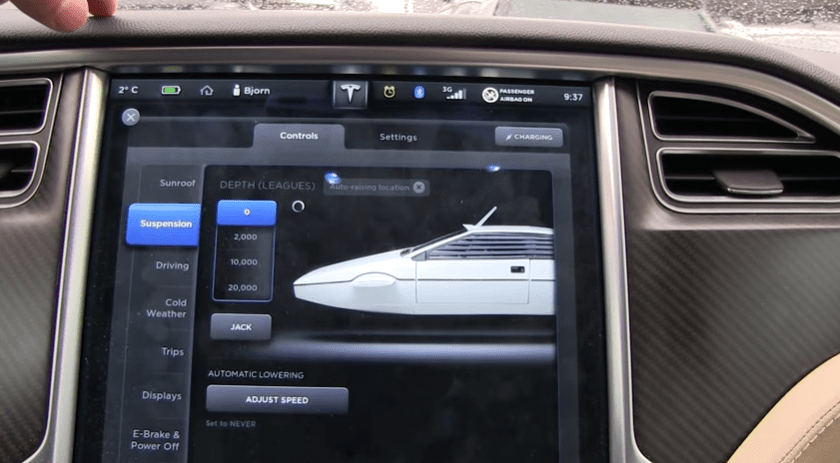
    TModelS_Dashboard
    Lotus Espirit with Submersible settings displayed

Set Depth option to 20,000 leagues (thanks, Jules Verne) and enjoy.

Additional reading…

Cheers!

hɔuᴉnb

AskQuincy – 2014 in review

The WordPress.com stats helper monkeys prepared a 2014 annual report for this blog.

Here’s an excerpt:

A New York City subway train holds 1,200 people. This blog was viewed about 4,300 times in 2014. If it were a NYC subway train, it would take about 4 trips to carry that many people.

Click here to see the complete report.

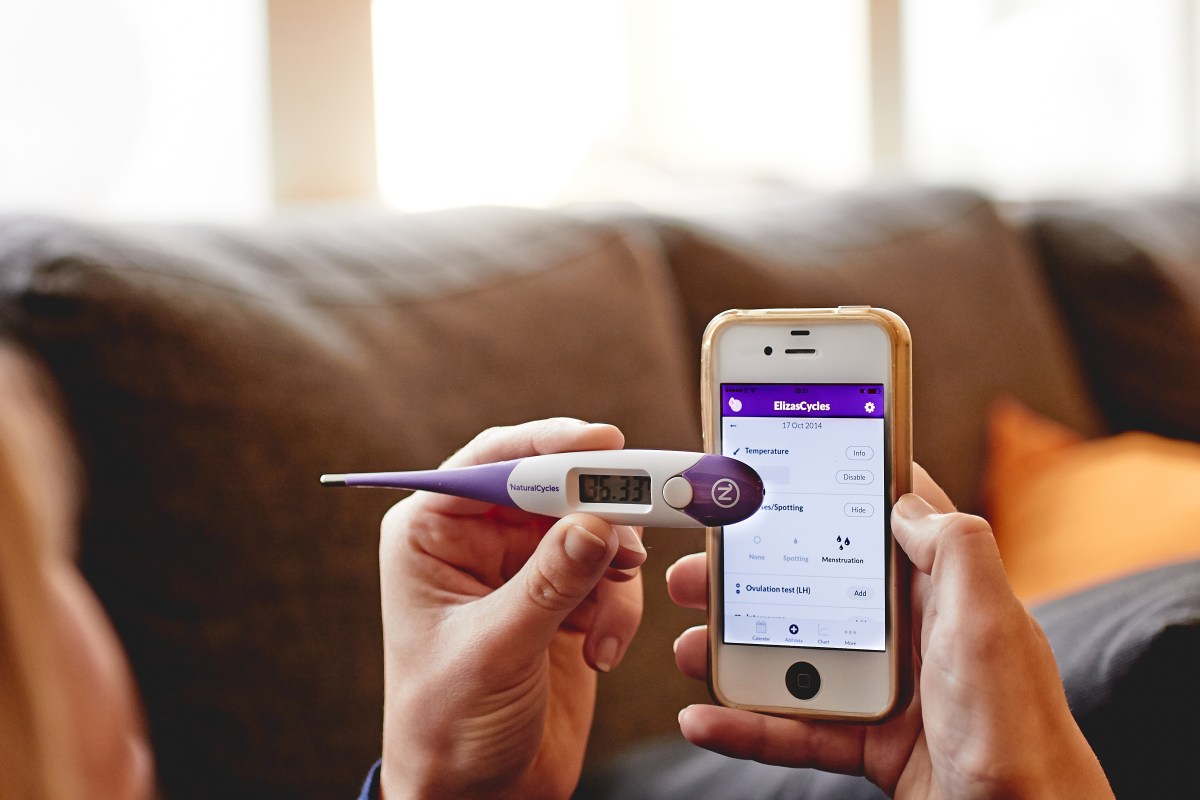
NaturalCycles Expands Its Contraception App Subscription Service In Europe

Contraception? Of course there’s an app for that, too!

Many apps offer family planning tools for couples looking to conceive. This Swiss startup, NaturalCycle, is using that data to help individuals engage in sex that does not result in pregnancy.

Now offering free trials, read on for more

April Fools’ Tips & Tricks

 Happy April 1st.

First the tip: When leaving your PC unattended, press WINDOWS KEY + L to lock your screen and keyboard. This will prevent you from falling prey to any seasonal pranks (like these).

Now the tricksHere is a short list of relatively harmless April Fools’ pranks you could play on a friend’s unlocked PC.

Windows

Change the Double+Click speed

“My mouse is broken”

  1. Click Start, type “mouse”, select Settings filter, then click Change Mouse Settings.
  2. Select the Buttons Tab.
  3. In the Double-Click area move the slider bar to the fastest setting.
  4. Click OK.

Flip the Screen

They might need to stand on their heads for a bit

  • Press CTRL + ALT + DOWN ARROW to rotate the display 180°
  • To return screen to normal press CTRL + ALT + UP ARROW

Excel

Cursor Up on Enter

Gravity will seem to have taken a holiday as Enter moves the cursor up instead of down.

  1. File/ Options / Advanced.
  2. In the Editing section, check After Pressing Enter move selection,
  3. For Direction select Up.
  4. Ok.

Ribbonus-Interruptus

Formula entry is problematic when pressing = moves the focus from the sheet to the Ribbon.

  1. File/ Options / Advanced.
  2. In the Lotus Compatibility section, in the Microsoft menu key field type  =.
  3. Ok.


Cheers!

hɔuᴉnb

MS Office: Insert Screenshot

Need to insert a screenshot into your presentation, document, spreadsheet or email? The Office 2010/2013 Insert Screenshot button makes this easy.

Watch this 60 second video to see all you need to know.


To Insert a Screenshot

  1. Display content window that has the material to capture. Do not minimize this window.
  2. Open or switch to destination application (i.e., MS Word, PowerPoint, Excel, or Outlook).
  3. Place cursor where you wish to insert the screen capture.
  4. On the Insert tab of the Ribbon, click Screenshot button. The available (i.e. not minimized) windows will display as thumbnails.
    • To insert an entire window; select associated thumbnail from the drop-down.
    • To insert a portion of the window previously displayed; select Screen Clipping, then CLICK + DRAG cross-hair around the portion to insert.
Additional reading..

Cheers!

hɔuᴉnb

Comments and questions are always welcome!

Enter your email address to subscribe to this blog and receive notifications of new posts by email.

← Back

Thank you for your response. ✨

Amazon’s drone delivery service

Incoming

What’s that buzzing? No cause for alarm, its just the latest installment of GTA flying at you. Catch!

Although not yet ready for primetime Amazon is hopeful that this small package delivery service will be start flying in 2016. If successful, it promises to drastically cut delivery time.

(Still no word on the flying cars we were promised)

Enjoy this video from Amazon.

Cheers!

hɔuᴉnb

Comments and questions are always welcome!

← Back

Thank you for your response. ✨

Happy Birthday, Windows

The year is 1985. Soviet leader Gorbachev meets with American President Reagan. Cocoa Cola unveils New Coke. Actor Rock Hudson dies of aids. Singer Madonna’s starts her first tour.

And on November 20, 1985, Microsoft releases Windows 1.0.

Unveiled in 1983, it would not be available for purchase until two years later. Arguably, that makes Windows 30 years old, but since many tricenarians, have a hard time with that milestone, we extend her two years grace..

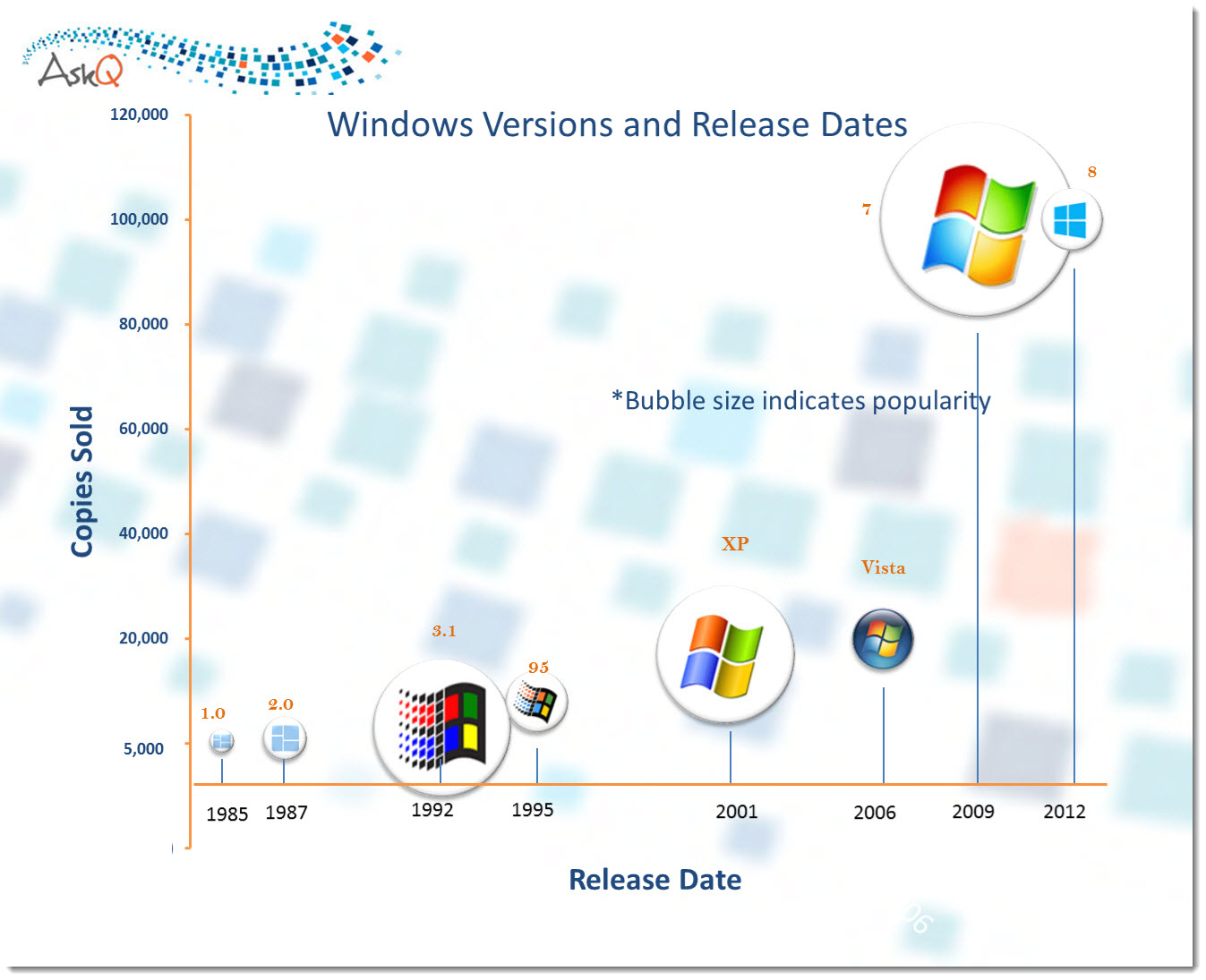
Over time her share of sales and public favor has varied, as illustrated by this infographic.

Timeline: Windows Logo Evolution 

WindowsReleaseTimeline
(click to enlarge)

Going Retro

Like most twenty-somethings, the Windows logo has had her own experiments with styleHere’s a look back at fashions past.   

WinEvolution
animation by FORBiES

Flashback: notice how similar the current Windows 8 logo is to the original!

Sharing Win’s birthday:

Additional reading..

Cheers!

hɔuᴉnb

Comments and questions are always welcome!

Enter your email address to subscribe to this blog and receive notifications of new posts by email.

← Back

Thank you for your response. ✨